Settings
Appearance
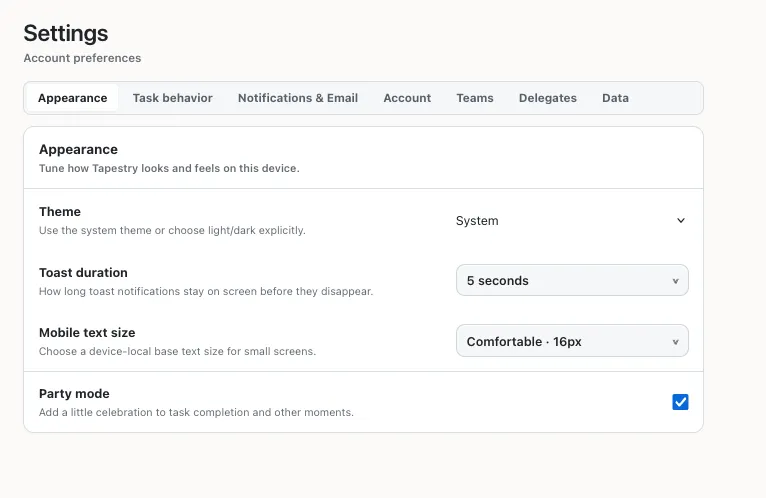
Theme
Choose between Light, Dark, and System (which follows your OS setting).
Toast Duration
Change how long toasts (the little popups that appear when you do something) stay on screen. This is helpful if you need a moment longer to consider “undos.”
Text Size
Adjust the size of the text in the application. This affects all copy text.
Party mode
Guess you’ll have to try it to see what it does.
Boards [Beta]
Show the Boards section in your sidebar. Boards are optional Kanban views of your workspace tasks, and this setting is off by default. Turning it off hides the sidebar section without deleting your boards.
Task behavior
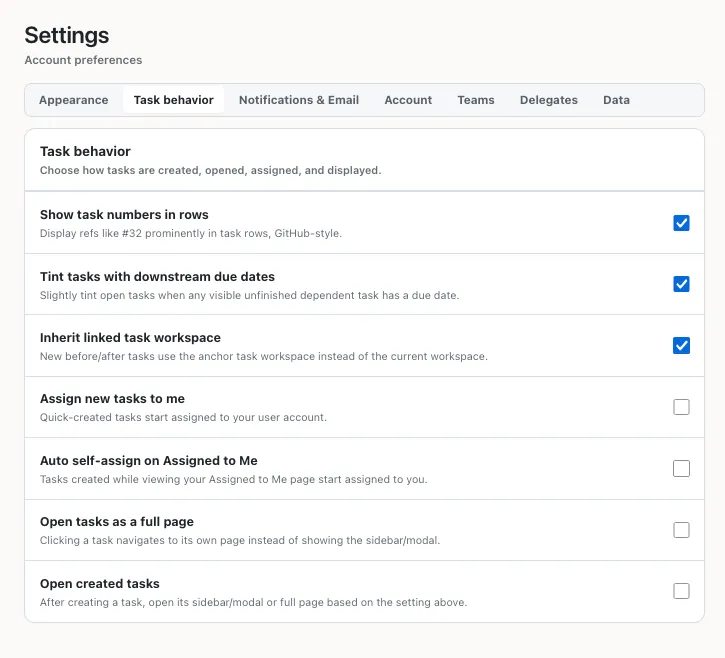
Show task numbers in rows
When enabled, each task will show its ID. You can refer to tasks in markdown boxes (titles, omnibars, comments, and notes) and when creating or linking tasks by using the task ID. For example, #123 will link to task 123 in the current workspace.
Tint tasks with downstream due dates
When enabled, tasks that have a downstream task with a due date will be tinted red. This is a visual cue that if you don’t do this task, something else will be late.
Inherit linked task workspace
When creating a new task as a “before” or “after” of an existing task, the new task will be created in the same workspace as the existing task. When disabled, the new task will be created in the current workspace.
Assign new tasks to me
When enabled, new tasks will be assigned to you by default. When disabled, new tasks will be unassigned by default.
Auto self-assign on Assigned to Me
When on the Assigned to Me page, new tasks will be automatically assigned to you. When off, new tasks will be unassigned.
Show tasks assigned to others in Now
When enabled, the Now page includes actionable tasks assigned only to other people or delegates. When disabled, Now shows only unassigned tasks and tasks assigned to you.
Show my delegates’ tasks in dashboard views
When enabled, dashboard task lists can include actionable tasks assigned to delegates you own. Tasks assigned only to other people or their delegates stay hidden.
Open tasks as a full page
By default, tasks open in a side-panel, or, on narrower screens, in a popup. When this setting is enabled, tasks will open in a full page instead.
Open created tasks
When you create a task, it will automatically open in a side-panel (or popup on narrower screens). When this setting is disabled, the task will not open automatically.
Notifications & Email
Notification delivery
Enable notification inbox
When checked, you will receive notifications about task activity in the Tapestry notification inbox.
Show notifications from visible workspaces only
When checked, the inbox only shows notifications from workspaces that are currently shown. This is an inbox filter; it does not change your email preferences.
Your workspace notifications
Choose a workspace, then select Send email, Notification inbox, both, or neither for each notification type. These are your personal choices for that workspace, not policies for other members. Every member can manage their own choices, including viewers. All email options start off.
You can receive notifications when a snoozed task becomes doable, a task assigned to you or one of your delegates becomes unblocked, or a task is assigned to you. Comments and mentions, task updates, invitation activity, and due-date risk have their own channel choices too. You can also choose whether to include actions performed by your own delegates.
These choices control activity notifications, not account-security emails or emails containing invitation links.
Snooze reminders are checked about once a minute. If unfinished visible prerequisites still block the task when its snooze ends, your reminder waits until it becomes doable; you do not need to enable the separate unblocked alert. Changing or clearing its snooze reschedules or cancels the reminder. Completing the task cancels its pending reminder. Turning off the global notification inbox does not turn off emails you explicitly enabled.
Task digests
Tapestry can send you overviews of your workspaces and tasks. You can choose to receive these digests daily, weekly, or never, and you can customize the time of day you receive them.
Account
Account management is handled here. You can change your email and account plan here, and you can also delete your account. Deleting your account deactivates your current subscriptions. You have one week after account deletion to reactivate your account and restore your data. After one week, your data will be permanently deleted.
To restore your account, email tapestry-accounts@pyrite.ai .
Teams
Teams you belong to or manage are listed here. To learn more about Tapestry for Teams, see the Teams guide.
Delegates
Delegates are bot users that can access your Tapestry account and do things on your behalf. You can create and manage Delegates here. To learn more about Delegates, see the Delegates guide.
Data
You can export your account data on this page. Data exports include all workspaces, tasks, and comments.